
How to See Gold Difference in LoL, in Your Own Games
League shows the gold lead in spectator mode and replays, but never while you play. Here is what the game does show you, the free way to see each lane's gold difference right on the Tab scoreboard, and how to read it.
Disclosure: we build Hexgate, the free League app that draws the gold difference on your scoreboard. The screenshots below are real captures of it.
The Short Answer
League does not show the gold difference in your own games. A companion app can add it to the Tab scoreboard, lane by lane.
Does League show it?
Not while you play. The Tab scoreboard shows items, levels, CS, KDA and bounties, and your own gold sits by your shop. Both teams' gold appears only in spectator mode and replays.
How do I see it, free?
With Hexgate, hold Tab: each lane's gold difference appears on the scoreboard's center line, with arrows pointing at the richer player, and both team totals sit above it. It is part of the free plan.
What number is it?
Item gold: the full shop price of every item each player holds, consumables left out. It is the gold already turned into power, which is what decides fights.
Where does it work?
Normal Draft, ranked Solo/Duo, ranked Flex and Swiftplay, where every row of the scoreboard is a lane matchup. The items come from Riot's own Live Client Data API.
How to Read the Gold on the Scoreboard
Everything appears only while you hold Tab, on League's own scoreboard. Point at a label to see where it sits.
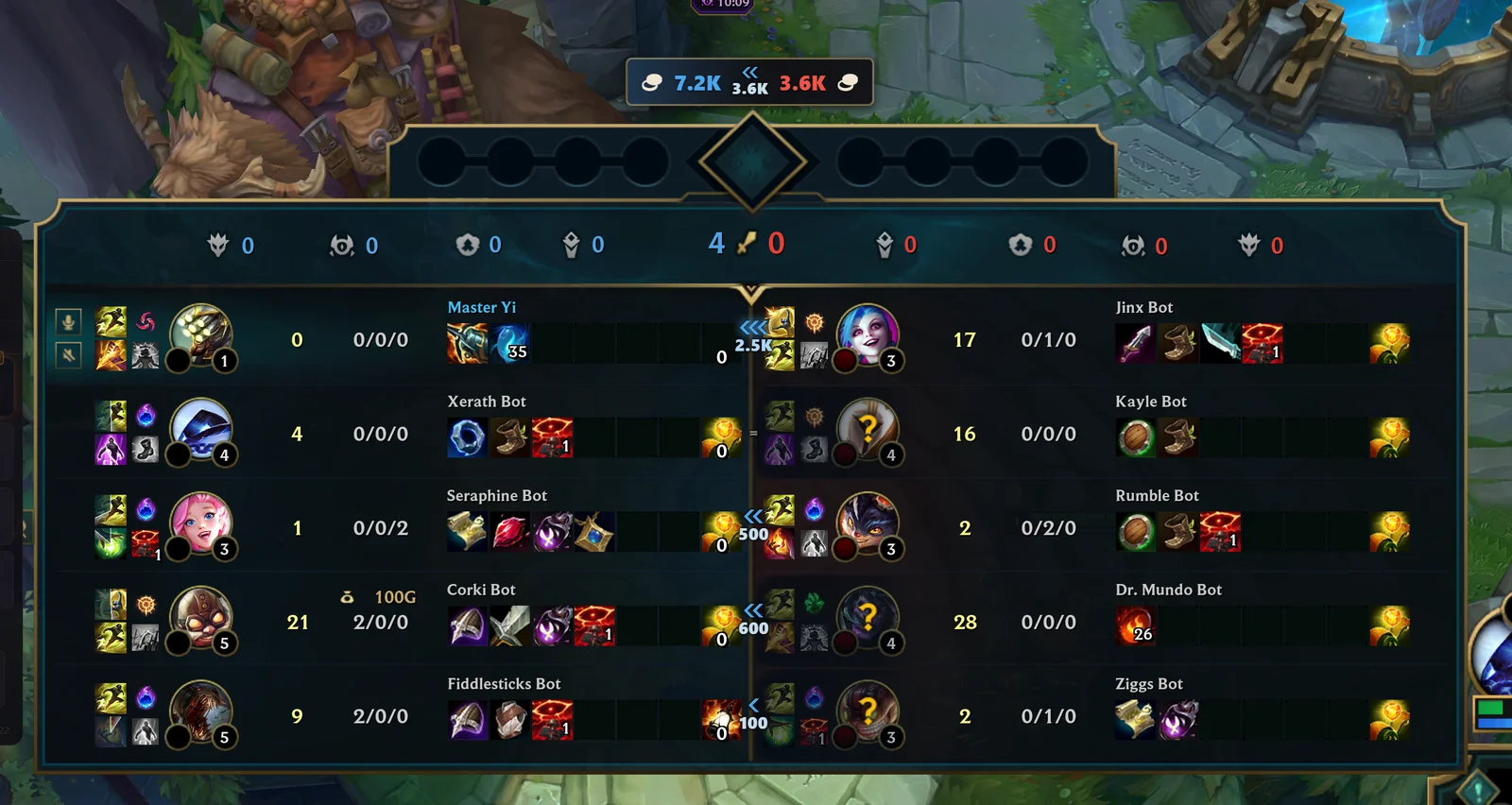
Blue means your team leads that lane, red means the enemy does, the same colors League uses on the scoreboard. If you turned off relative team colors in League's settings, Hexgate follows that setting.
Item Gold vs Total Gold: What the Number Means
The number on the scoreboard is item gold: the full shop price of every item in a player's inventory, the same prices you see in the shop.
- Counted: completed items, components, boots, starting items and support items, each at its full shop price. A Pickaxe counts 875 gold, a finished item its whole cost.
- Left out: potions, Control Wards, elixirs and other consumables, because they are used up and give no lasting power.
- Not visible to anyone: unspent gold in a player's pocket. Nobody can see it in a live game, and it turns into items at the next recall anyway.
That makes item gold a better measure of who wins the next fight than total gold earned: a player sitting on 1,300 unspent gold is not stronger until they spend it. Right after someone recalls, their number jumps; that is the moment their lead becomes real.
Which Games Show the Lane Gold Difference
Lane gaps only make sense when every row of the scoreboard is a lane matchup, so Hexgate shows the gold where League sorts both teams by role.
- Normal DraftLanes and team totals
- Ranked Solo/DuoLanes and team totals
- Ranked FlexLanes and team totals
- SwiftplayLanes and team totals
- ARAM, Arena, Practice ToolNot shown
On the free plan it works in every game where Hexgate runs for you, within your 3 free games a day; Pro and Pro+ have no limit. It follows the scoreboard if you drag it somewhere else, and it hides while the shop or a menu covers the scoreboard.
How to Use the Gold Difference to Win More
A gold lead is only useful if you act on it. A few habits that turn the number into decisions:
Ahead in lane: press it
Two or three chevrons on your side mean your items are better than your opponent's right now. Trade, take plates and push for your jungler before they catch up at their next recall.
Behind in lane: play for time
If the arrows point at your opponent, avoid even trades, farm under tower and ask for help. Gold gaps of one item or more rarely close by fighting harder.
Find the fed enemy
The red lane with three chevrons is the player to track, ward against and focus in fights, and the one to build against first.
Check the team gap before objectives
Before dragon or Baron, a glance at the team totals tells you whether your team can take the fight or should trade the objective for something else.
Look again after recalls
Gaps jump when someone shops. If the enemy laner just recalled with a lot of gold, the gap you saw a minute ago is gone.
Porofessor and Other Gold Difference Overlays
Hexgate is not the first app to show a gold difference. Porofessor is known for drawing gold differences on the scoreboard, and several other League apps show gold leads in their own panels. What differs is where the number appears and what comes with it.
- On the scoreboard itself: Hexgate finds League's scoreboard wherever you put it and draws on its center line, so you read the gold where the players already are.
- Free, no Overwolf, no ads: Hexgate is a standalone app, and the gold difference is in the free plan.
- The same Tab press shows your next item, ranked against the five enemies, with the reason on every change.
Comparing the apps in detail? See our Porofessor alternatives and the best LoL overlays in 2026.
Is a Gold Difference Overlay Allowed?
Hexgate's gold difference adds up what the scoreboard already shows you: the items every player holds. It reads them from Riot's Live Client Data API, the official local API the game provides for apps, and only finds where the scoreboard is on your screen to place the numbers. It does not read the game's memory, change game files or inject anything into League. For the full picture of what Riot allows, see can you get banned for LoL apps.
Don't want it? Open Hexgate's Settings, the gear at the top of the dashboard, and switch off Scoreboard gold. It is on by default.
Frequently Asked Questions
How do I see the gold difference in League of Legends?
League shows both teams' gold only in spectator mode and replays. In your own games, use a companion app: with Hexgate, hold Tab and each lane's gold difference appears on the scoreboard's center line, with both team totals above it. It is free.
Can you see the enemy's gold in LoL?
Not their pocket gold. You can see every enemy's items on the Tab scoreboard, and from those items Hexgate works out how much gold each player has turned into items and compares it with their lane opponent.
Is there a free gold difference overlay for LoL?
Yes. Hexgate's scoreboard gold is part of its free plan, without ads or Overwolf. It works in Normal Draft, ranked Solo/Duo, ranked Flex and Swiftplay.
Does Porofessor show the gold difference?
Porofessor is known for showing gold differences on the scoreboard. Hexgate shows them free too, on League's own scoreboard, and also ranks your next item against the enemy team.
How is the gold difference calculated?
Hexgate adds up the full shop price of every item each player holds, leaving out consumables like potions and Control Wards, then compares each player with the enemy in the same role and the two teams with each other.
Why does the gold difference jump after a recall?
Because it counts items, not unspent gold. When a player recalls and buys, their gold becomes items and the gap moves at once.
Can I get banned for a gold difference overlay?
Hexgate only adds up the items the scoreboard already shows, read through Riot's official Live Client Data API. It does not read game memory, modify files or inject into the game.
How do I see the gold difference in a LoL replay?
Replays and spectator mode show both teams' gold at the top of the screen. During your own live games that view is hidden, which is the gap Hexgate fills.