Know exactly what to build.
Every game, against every enemy team.
An AI-powered League of Legends overlay that analyzes enemy team composition in real time and recommends the optimal items for every slot - backed by data from millions of games.
Hexgate runs on Windows PCs. Open hexgate.app on your computer to install it.
Reads only Riot's official Live Client API. No memory reading, no game file changes.


See it before you install it
Every shot below is the actual interface, with real recommendations from the live engine. Pick a view.
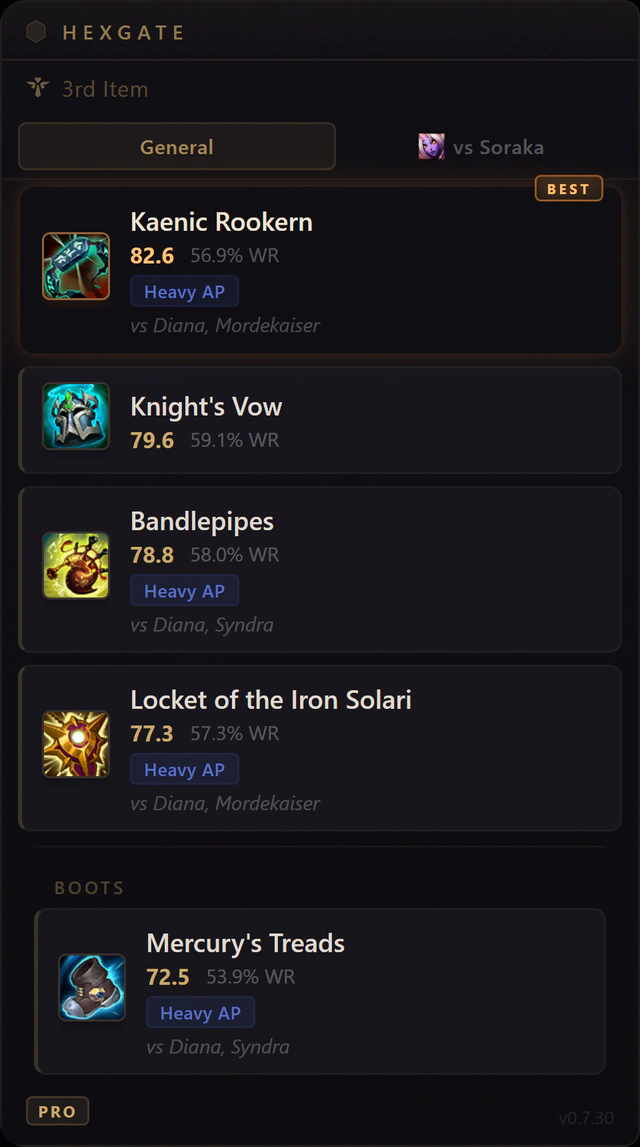
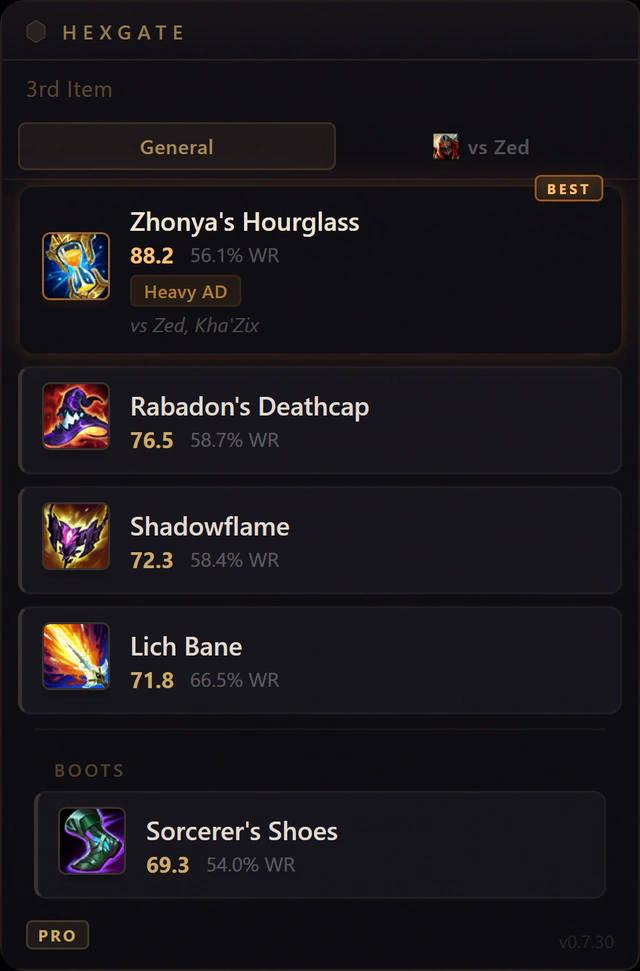
Same overlay, opposite answers. Leona's lobby has three AP threats: Kaenic Rookern tops the list and even the boots go magic resist. Ahri is facing Zed and Kha'Zix: Zhonya's Hourglass jumps the queue.
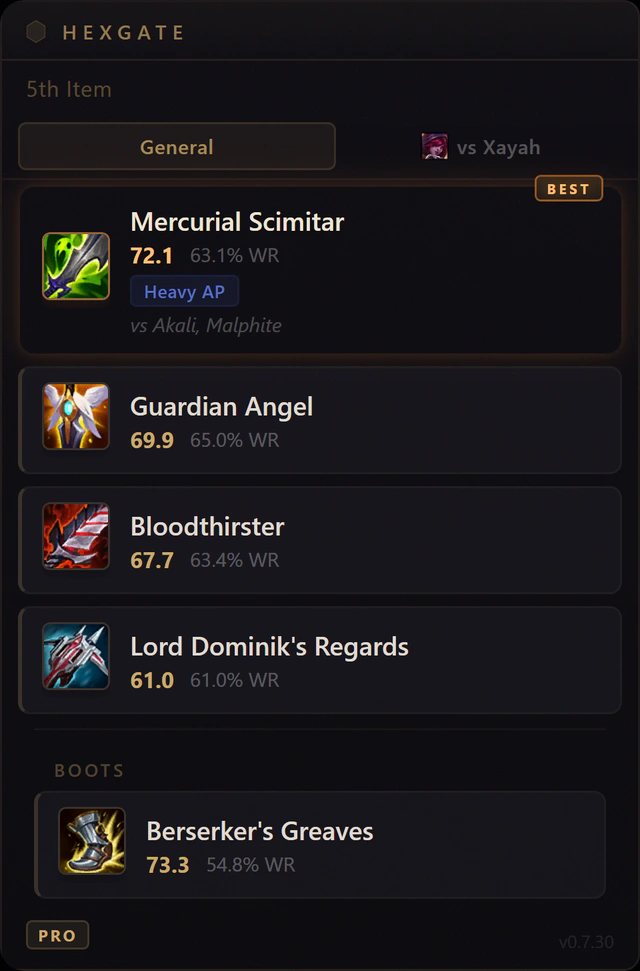
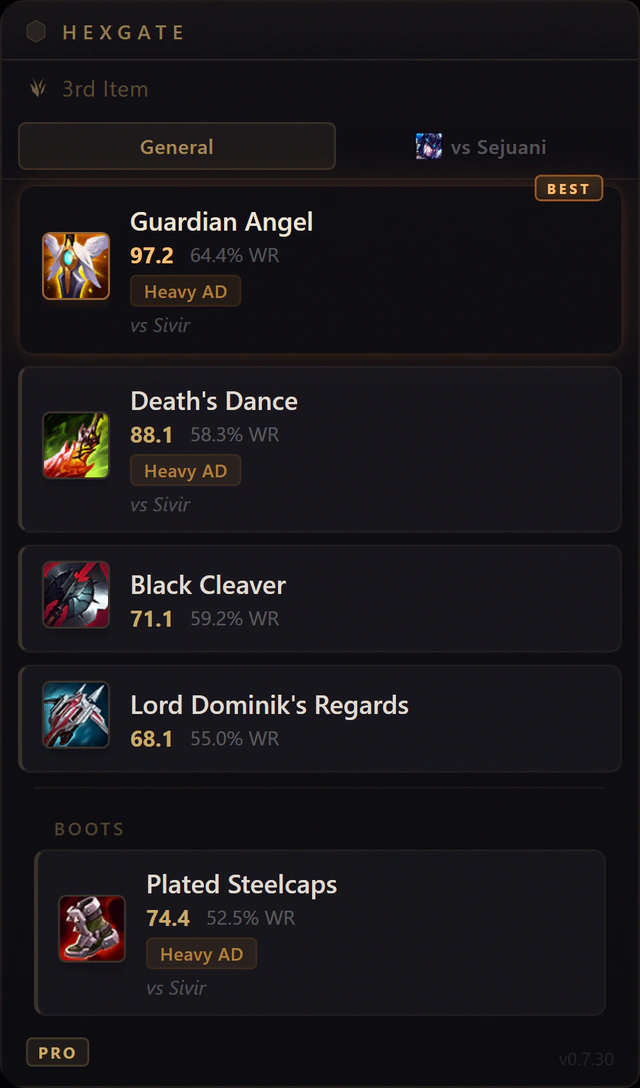
Kills and levels feed the scoring. An 8/3 Akali flags a Mercurial Scimitar for Jinx before you'd think to look for one. A fed Sivir behind three tanks gets Vi a Guardian Angel and Plated Steelcaps.
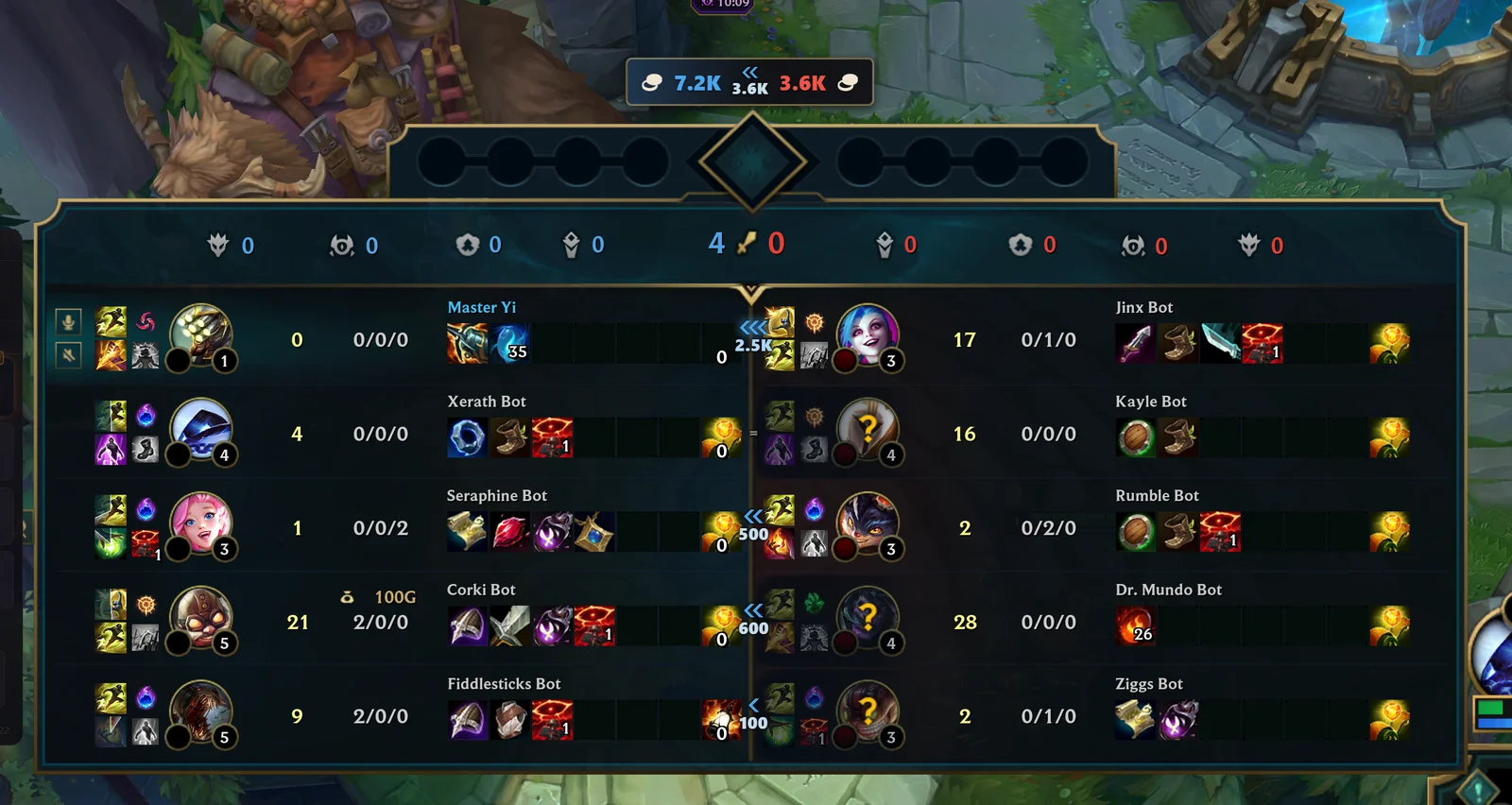
Who is ahead, lane by lane. Hold Tab and each lane's item gold difference sits on League's own scoreboard, with chevrons pointing at the richer side and both team totals above it. Free, in Draft, ranked and Swiftplay. How to see gold difference in LoL.
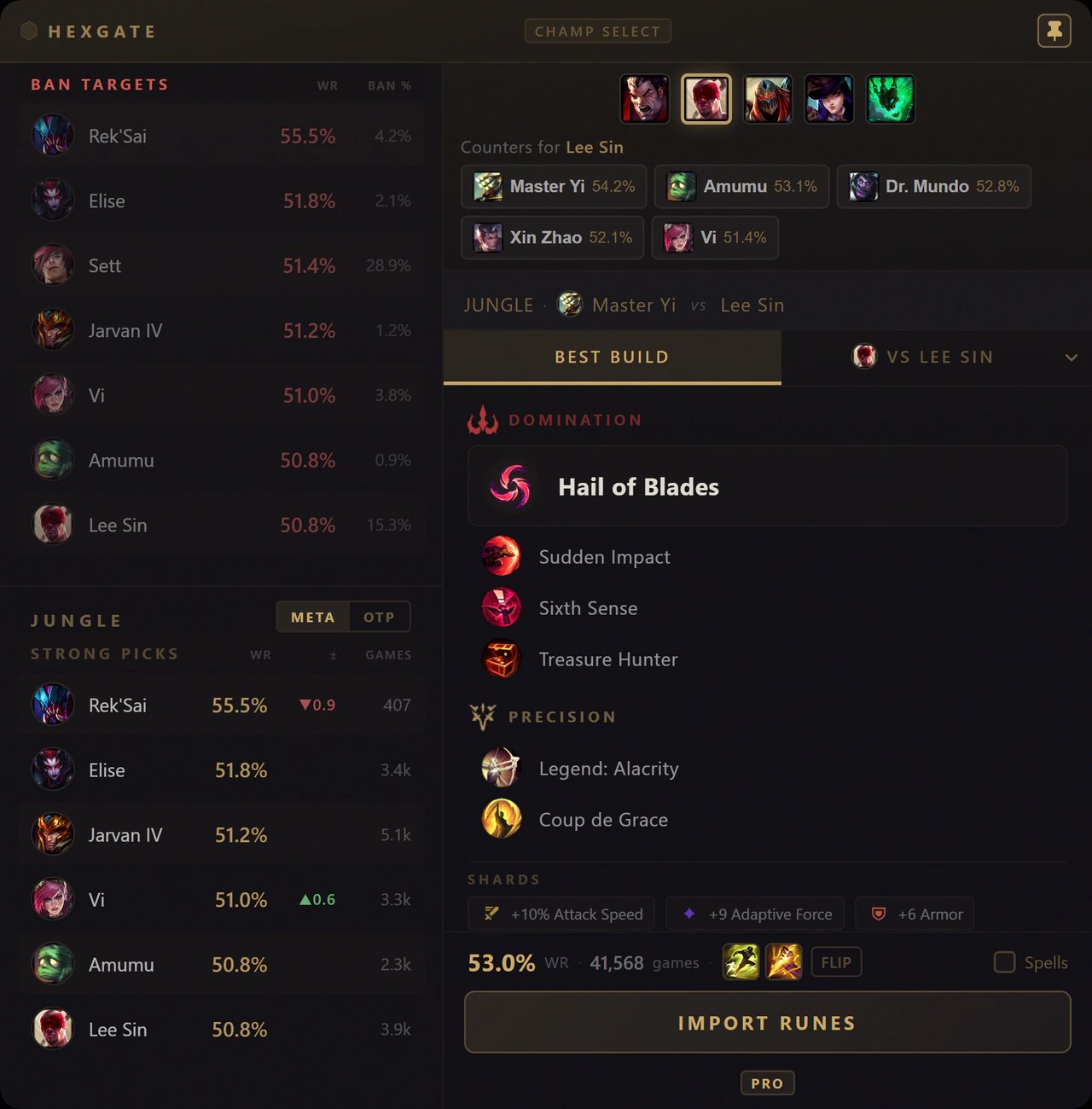
Before the game loads. Ban targets, counters for the enemy pick, strong picks for your role, and the best rune page imported in one click.
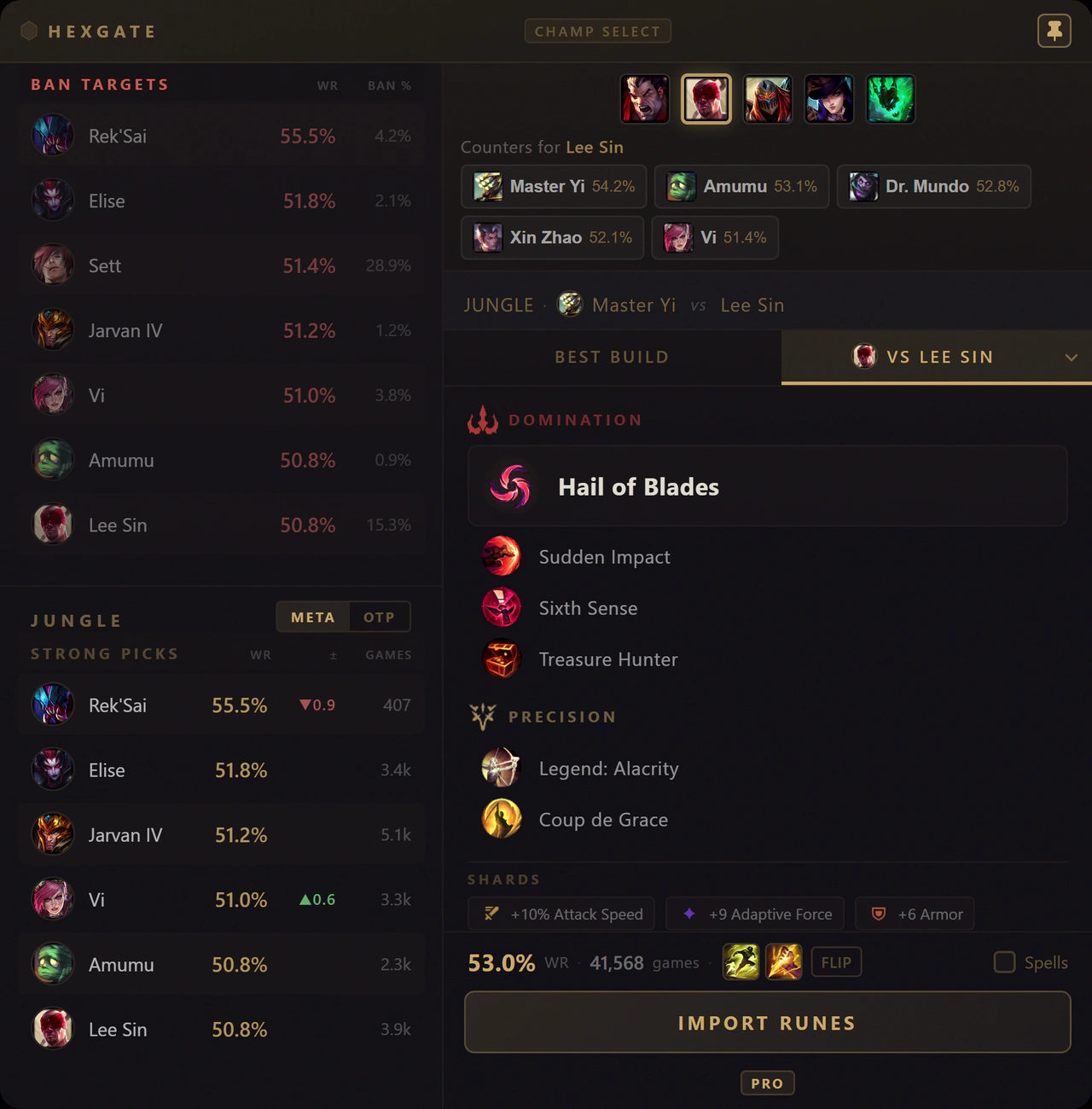
The VS tab re-tunes everything for your exact lane opponent instead of the global average.
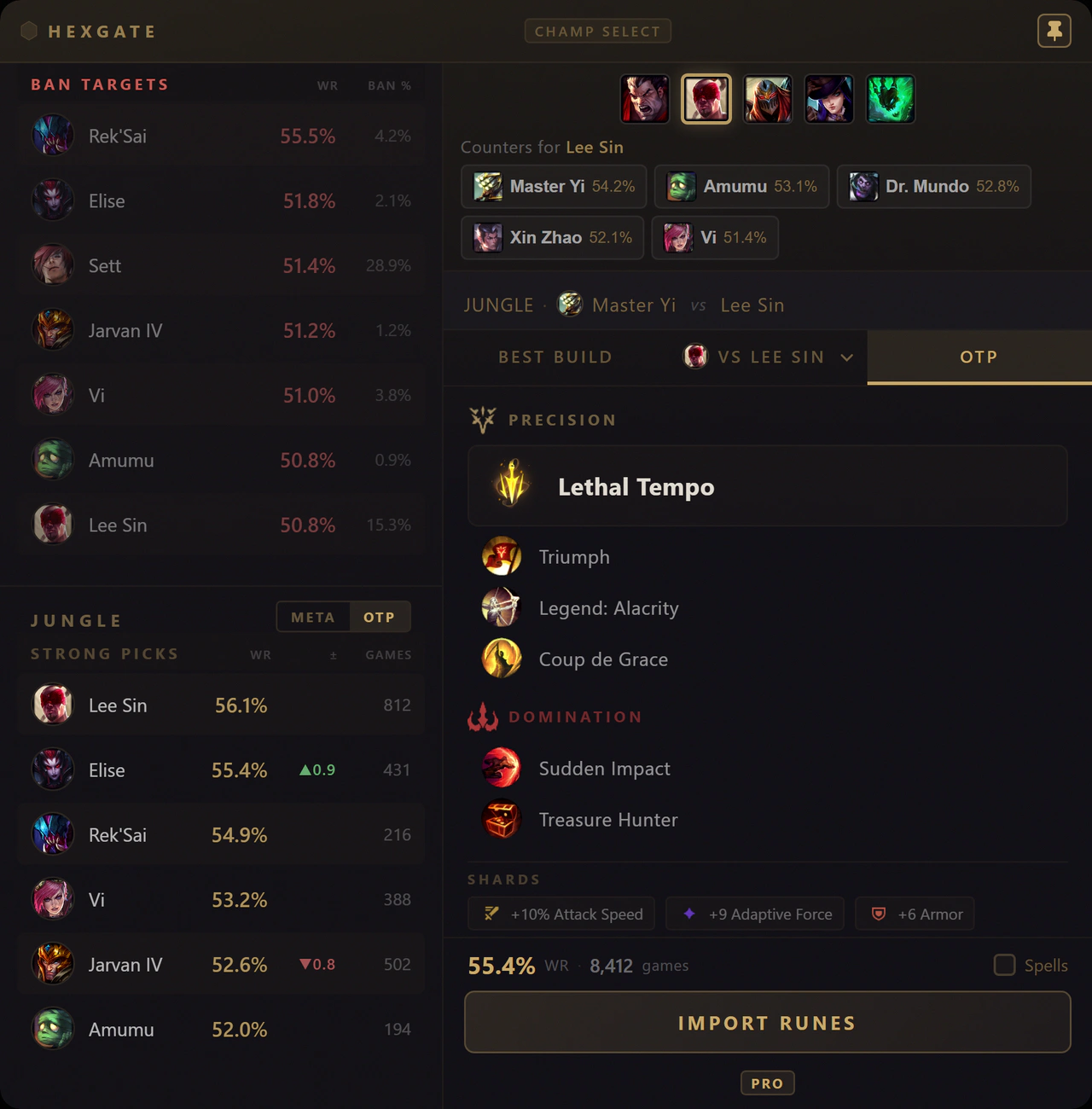
One-tricking? The OTP tab builds your rune page from dedicated mains' games instead of the general population - and the sidebar ranks picks the same way.
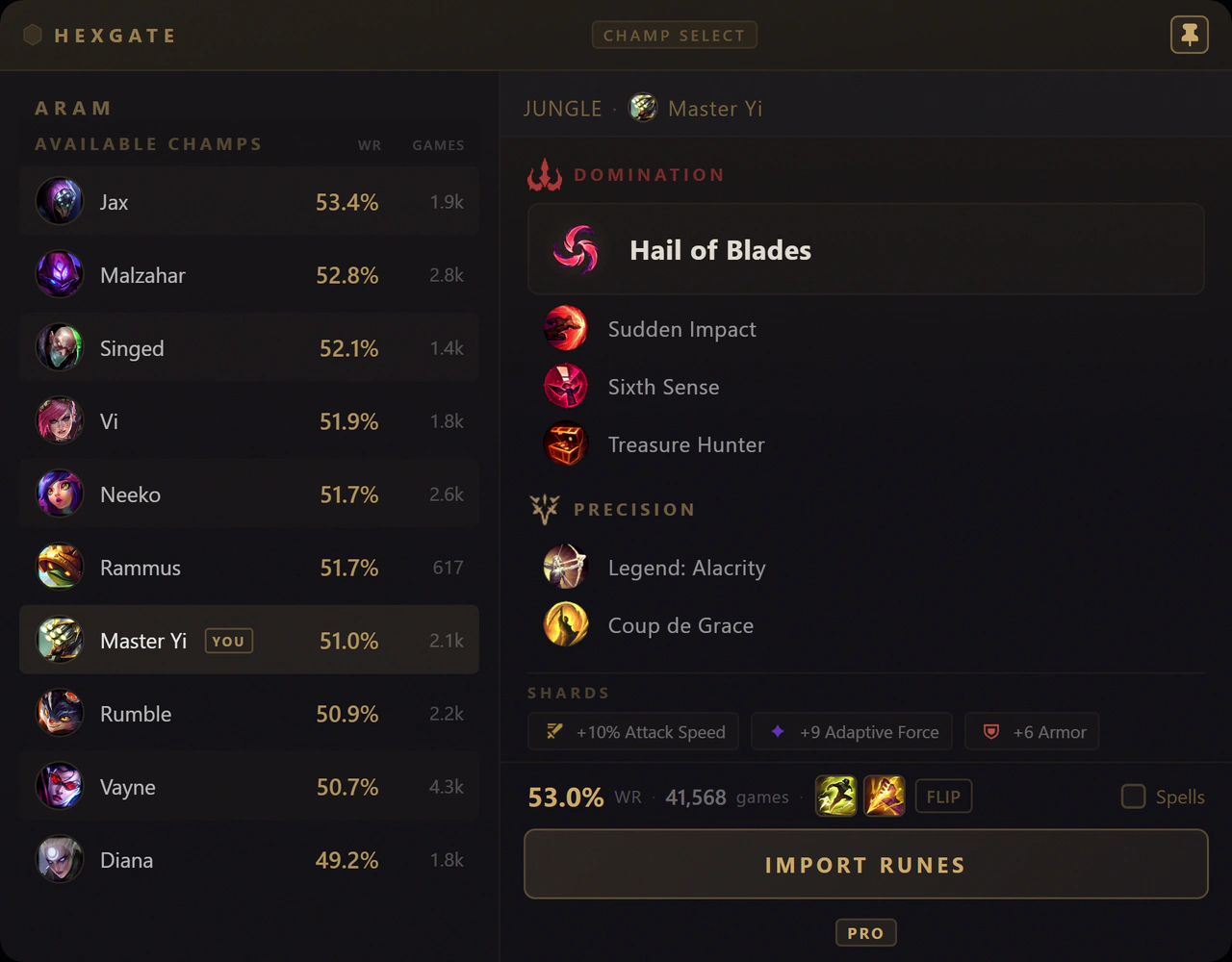
ARAM too. Every champ on your bench ranked by win rate - know who to swap to before the timer runs out.
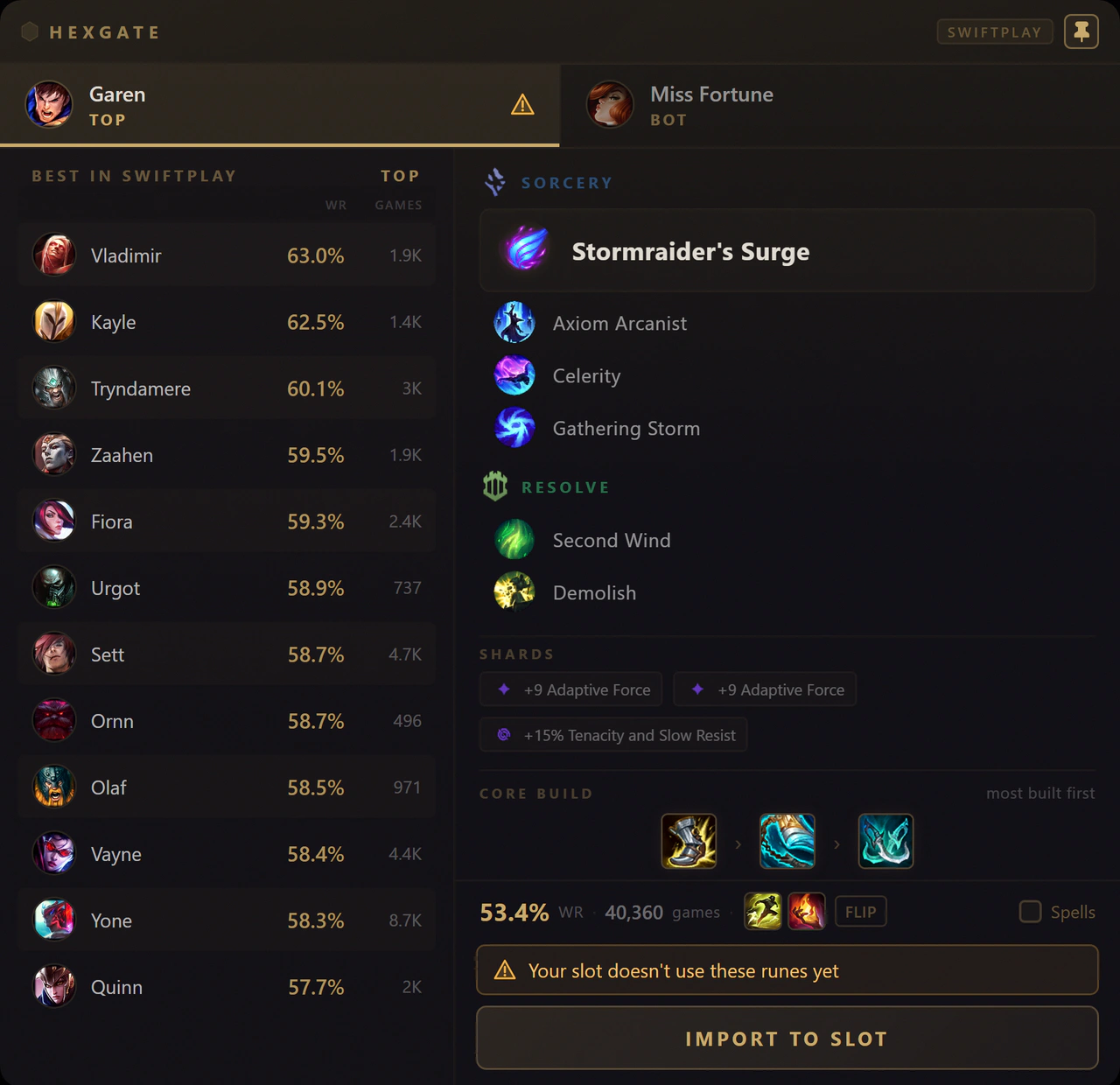
Swiftplay, sorted before you queue. A tab for each of your two picks: the best Swiftplay champions for that role, the runes and spells, and one click to put them in your slot. How it works.
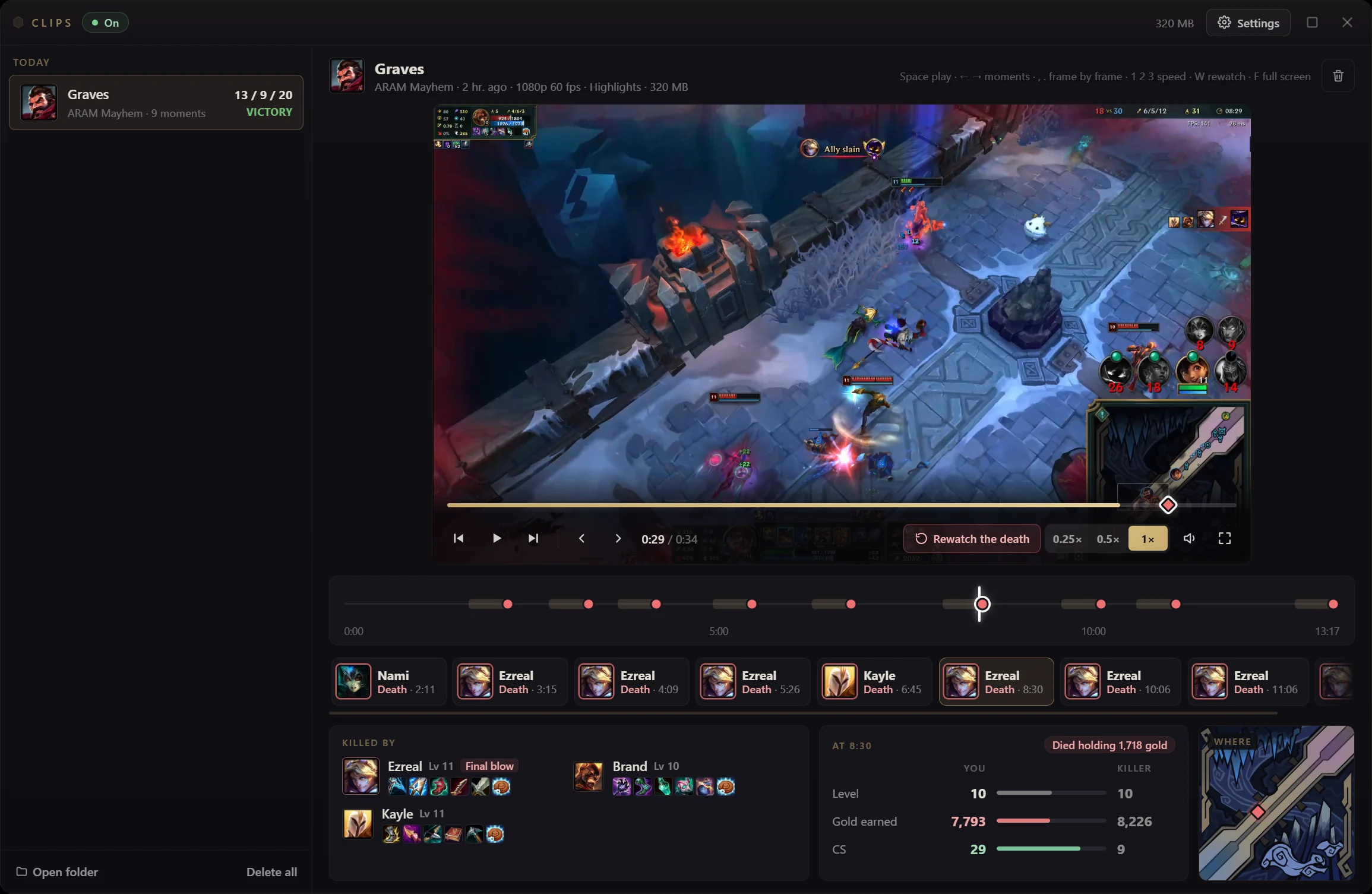
Every death, ready when the game ends. Pro+ records your deaths, kills and assists while you play. Rewatch them in slow motion, see who killed you and where, and spot what to do differently next game.
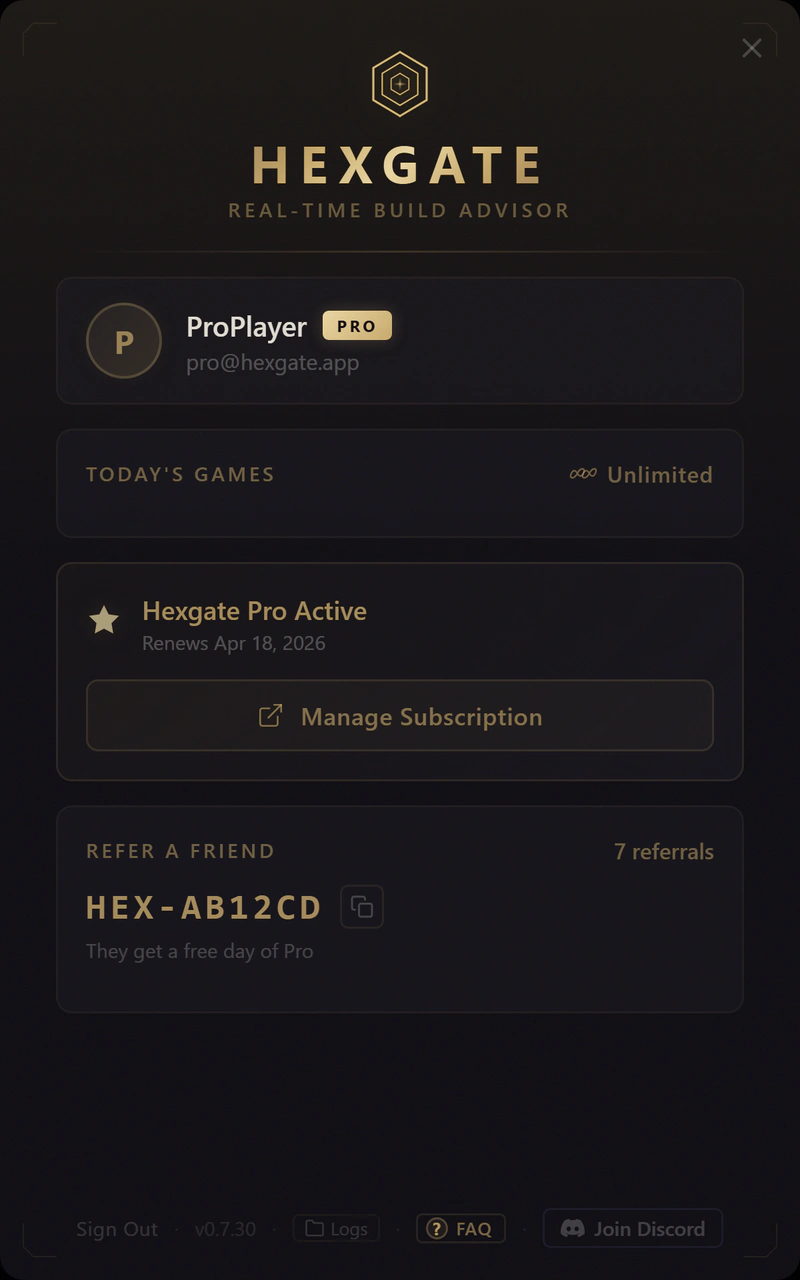
Between games, it disappears. No launcher, no browser tabs - one small hub for your games, Pro, and referrals. The rest only shows up when League does.
One overlay, built around the game you are in
Hexgate runs silently as an overlay, giving you the right items at the right time - no alt-tabbing, no guesswork.
Optimal item builds appear the moment you load into game. The AI analyzes all five enemies and recommends items slot by slot, backed by real winrates and pickrates from millions of ranked games.
Hold Tab in Draft, ranked or Swiftplay and each lane's item gold gap appears on League's own scoreboard, with both team totals above it. How to read the gold difference.
See which items perform best against your lane opponent specifically. Randuin's into Yone, Banshee's into Syndra - 1v1 matchup data that gives you the edge in lane.
During champion select, import the highest winrate rune page for your champion directly into the client. No more alt-tabbing to external guides.
Strong picks and ban targets for your assigned role from current patch data, shown the moment you enter champion select.
Know your lane before minions spawn
With Pro+, the loading screen shows what your lane opponents and the enemy jungler tend to do early, counted from their own ranked or Swiftplay games.
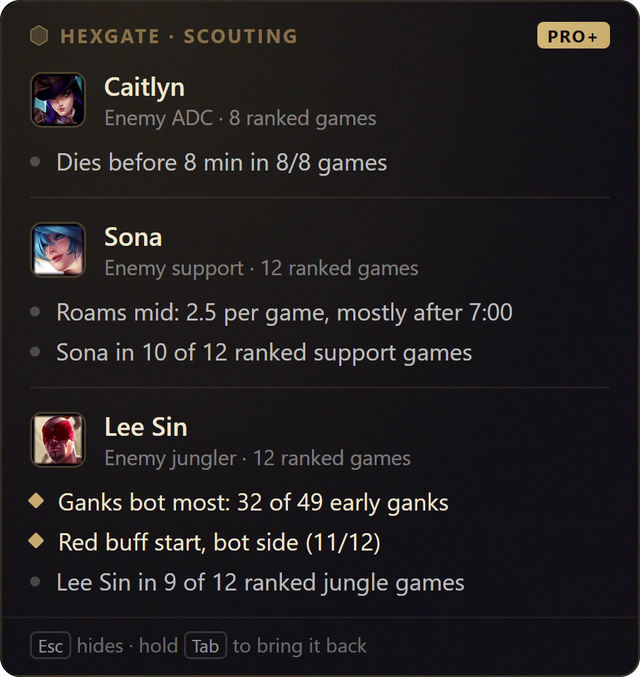
Their habits, counted from their own games
Hexgate reads up to 12 of each player's recent games of the same mode (ranked or Swiftplay) in the role they play now, and every line says how often the habit happened. Players with fewer than 4 games in the role are left out, never guessed.
- The enemy jungler. Start side, level 1 invades, first gank and the lane he ganks most.
- Your lane opponents. Early solo kills, early deaths, CS at 10 and roams.
- Nothing to set up. On screen until 1:30 in ranked, hold Tab to see it again.
See exactly why you won or lost
After every ranked, Draft and Swiftplay game, Pro+ explains the result from the game's own timeline: what hurt, what helped, and the evidence for each.
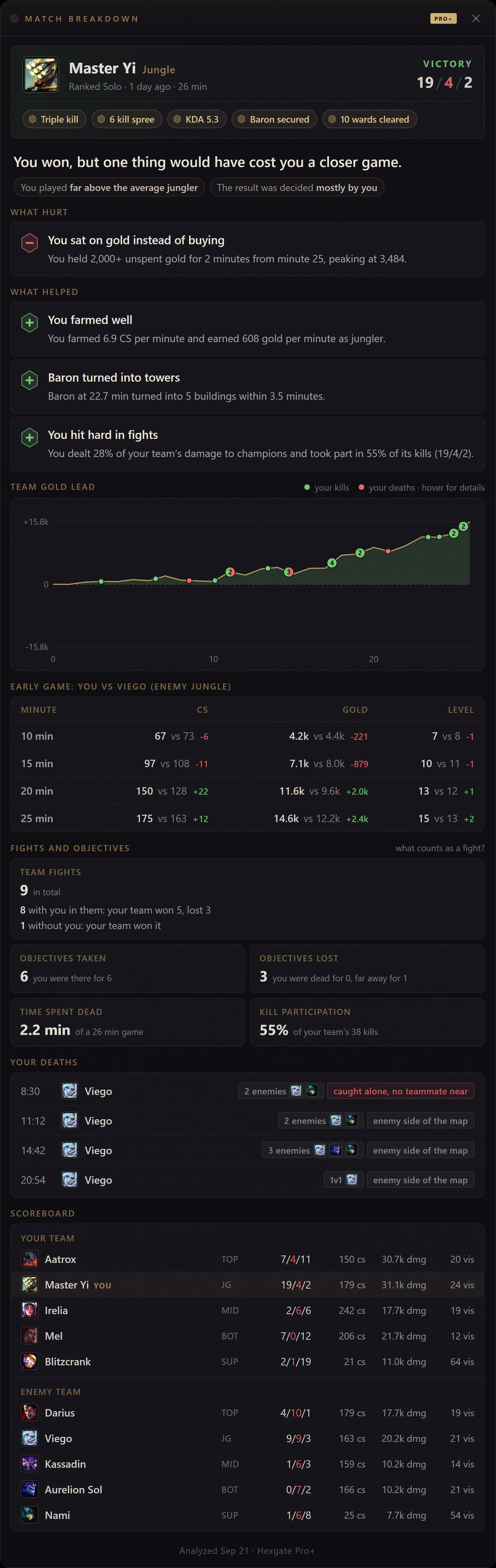
What hurt, what helped, with the evidence
Every card is one thing that changed the result, in plain words, backed by the numbers from your own game.
- Only what mattered. A small vision gap in a stomp is not a leak. A loss that was not on you says so.
- Judged for your role. Ganks for junglers, vision and roams for supports, the matchup and towers for laners.
Your kills and deaths, minute by minute
Watch the lead build, and spot the moment it slipped. Every kill and death sits on the curve. Hover one to see who, when, and whether you were caught alone.
- Throw detection. Where the lead peaked, where it ended, and how many times you died in between.
What the scoreboard never tells you
How many fights happened without you, and how they went. Which dragons and Barons fell while you were dead or far away. Who killed you, every time, and who else was there.
- Baron usage. Whether a Baron turned into towers or was wasted.
Rewatch every death. Fix what keeps killing you.
Coaches and pro players all give the same advice: watch your own deaths. Pro+ does the recording for you. Keep Hexgate open, play, and the moment the game ends every death is ready to rewatch.
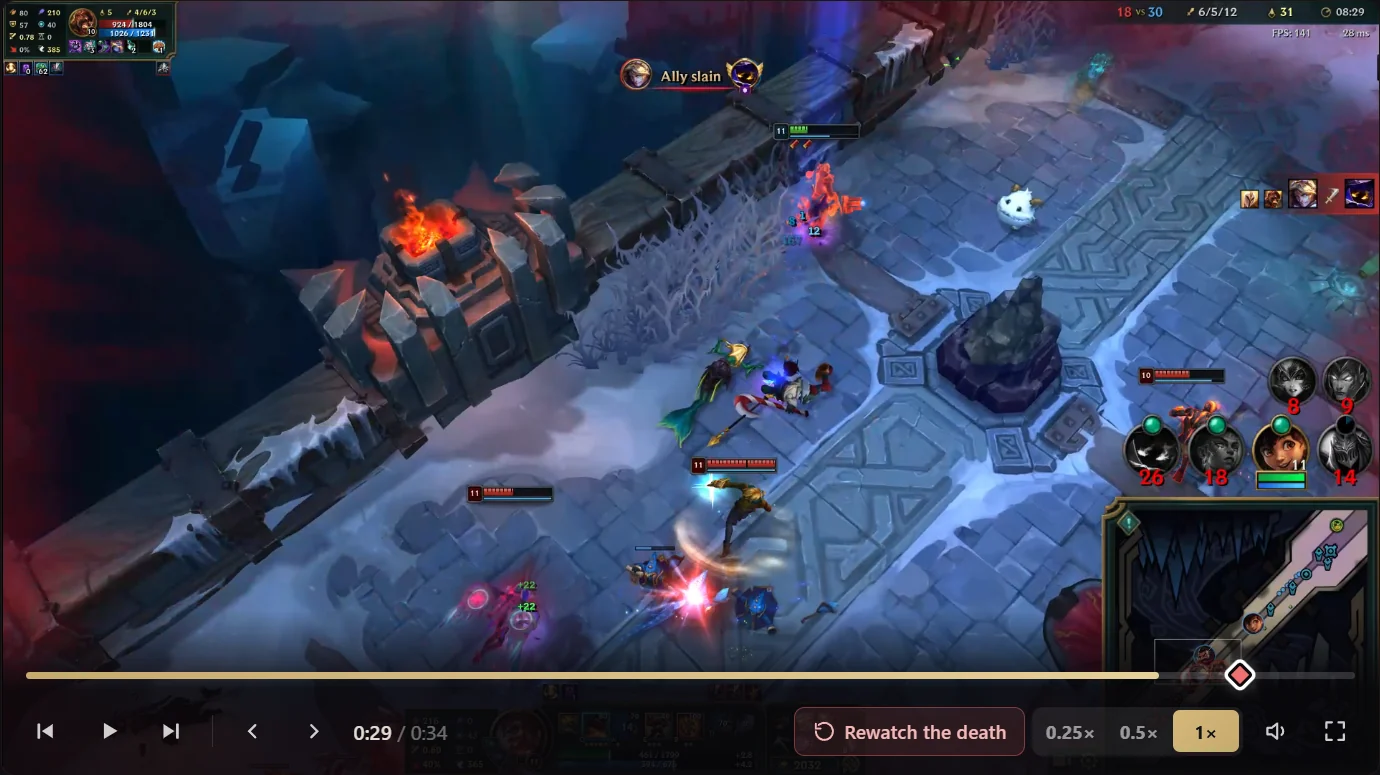
Recorded while you play
No replay files to open, no recording app to set up, nothing to clip by hand. Hexgate records the League window and the game's sound only, with your graphics card's video encoder, so the game keeps its frame rate.
Slow it down
Play the seconds before a death at quarter speed or frame by frame. Every death, kill and assist sits on the game timeline, one click apart.
See what went wrong
Who killed you and who got the final blow, where it happened, and your gold and levels against theirs. The Match Breakdown tells you why you lost; the clip shows you the moment.
- Your settings. Deaths, kills and assists, 15 or 30 second clips, quality presets or an exact bitrate up to your game's resolution at 120 fps, H.264 or AV1, or the full game with every moment marked.
- Stays on your PC. Saved in your Videos folder, never uploaded. You choose how many games to keep.
- Draft and ranked by default. Turn on ARAM and ARAM Mayhem in settings.
Up and running in 60 seconds
No complicated setup. Sign in, play a game, and Hexgate handles the rest.
Create a free account with Discord, Microsoft, Google or email. It takes a few seconds.
Hexgate detects your champion and the enemy team automatically. No manual input needed.
Press TAB to see item recommendations. Scored, ranked, and updated in real-time as you play.
Start free, go Pro when ready
Get 3 free games every day. Pro unlocks unlimited games and matchup intelligence. Pro+ adds Lane Scouting on the loading screen, a breakdown of every ranked, Draft and Swiftplay game and every death saved as a clip.
- 3 games per day
- Item recommendations
- Rune page import
- Gold difference on the scoreboard
- Auto-updates
- Matchup scoring
- OTP builds
- Lane Scouting, Match Breakdown and Clips
Worlds offer for new subscribers until the final: 3 months at 25% off on yearly, or €3.74 for your first month.
- Unlimited games
- Item recommendations
- Rune page import
- Gold difference on the scoreboard
- Lane matchup scoring (vs opponent)
- OTP one-trick builds
- All game modes
- Lane Scouting, Match Breakdown and Clips (Pro+)
Subscribe here, then sign in to the app with the same account.
Worlds offer for new subscribers until the final: 3 months at 25% off on yearly, or €7.49 for your first month.
- Everything in Pro
- Lane Scouting on the loading screen
- Match Breakdown of every ranked, Draft and Swiftplay game
- Highlights on every game
- Clips of every death to rewatch
Subscribe here, then sign in to the app with the same account.
Invite friends, both get 7 days of Pro
Your friend gets a week of Pro after their 3rd game, and so do you, up to 90 days. Already subscribed? Each friend takes a week off your next invoice instead.
Hexgate in plain facts
| What it is | A desktop overlay for League of Legends that recommends items against the five enemies in your live game, not a static build copied from a guide. |
|---|---|
| How it decides | Reads the enemy team from Riot's Live Client Data API, then scores every viable item for your champion and slot against their damage split, crowd control, healing, shields, tankiness and fed threats. Every comp-driven nudge is labeled with its reason. |
| Data source | Win rate and pick rate data from millions of ranked games, refreshed every patch. New items work on patch day because item behavior is derived from Riot's own item data. |
| Runtime | Native Tauri (Rust) app, typically under 100 MB of RAM. No Overwolf, no Electron, no ads, no in-game injection. |
| Also included | One-click rune import, champion select counters and ban targets, each lane's item gold difference on the Tab scoreboard (how it works), ARAM Mayhem augment tier badges. |
| Pro+ | Lane Scouting before the game, a Match Breakdown and Clips after it. Your lane opponents' early habits on the loading screen, then an AI analysis of every ranked, Draft and Swiftplay game that shows why you won or lost, and every death recorded automatically so you can rewatch it. |
| Price | Free: 3 games per day, no ads, free account. Pro: unlimited games, lane matchup scoring and one-trick builds for €4.99/month or €3.74/month billed annually. Pro+: everything in Pro plus Lane Scouting, a Match Breakdown of every ranked, Draft and Swiftplay game and Clips of every death for €9.99/month or €7.49/month billed annually. |
| Platform | Windows 10 and 11. Auto-updates. Compliant with Riot's third-party tool rules: no game file changes, no memory reading, no input automation. |
| Compared to | Blitz, Mobalytics, Porofessor, OP.GG and U.GG import one aggregate build before the game. Hexgate is the one that keeps adapting during it. See the full overlay roundup. |
Frequently asked questions
Hexgate is a free real-time desktop overlay for League of Legends that recommends optimal items based on enemy team composition. It analyzes all five enemies and suggests the best items for each slot, powered by winrate and pickrate data from millions of ranked games.
Yes. Hexgate is free with 3 games per day including item recommendations, rune imports, gold difference on the scoreboard, and auto-updates. Hexgate Pro costs €4.99/month (or €3.74/month annually) for unlimited games, lane matchup scoring, and OTP builds.
Hexgate uses an AI algorithm that analyzes enemy team composition (damage types, CC, healing, tankiness) and cross-references it with winrate and pickrate data from millions of ranked games to score and rank items for each build slot.
Hexgate reads only from Riot's official Live Client Data API, which is a public API provided by Riot Games for third-party tools. It does not modify game files, inject code, or interact with the game client in any unauthorized way.
Lane matchup scoring is a Pro feature that shows which items perform best specifically against your lane opponent. While the General tab scores items against all 5 enemies, the matchup tab focuses on 1v1 data for your lane, helping you win trades and duels.
Lane Scouting is a Pro+ card that appears when a ranked or Swiftplay game loads. Hexgate looks up your lane opponents in up to 12 of their most recent games of that mode (ranked, or Swiftplay in Swiftplay) in the role they are playing now and shows what they tend to do early: the enemy jungler's start side, level 1 invades, first gank and the lane he ganks most, and for laners early solo kills, early deaths, CS at 10 and roams. The jungler is only shown when his habits concern your lane. It needs to see player names: if League's Streamer Mode hides other players' names on your screen, only champion names are left and nothing can be scouted, so keep that option off (hiding your own name is fine). Players with fewer than 4 recent games of that mode in that role, or a hidden name, are left out. The card stays until 1:30 in game and comes back while you hold Tab. Free and Pro players see how many insights were found. How Lane Scouting works.
Clips is a Pro+ feature that records your deaths, kills and assists while you play, so you can rewatch them the moment the game ends. Coaches tell players to review their own deaths; Hexgate does the recording for you, with no replay files to open and no recording app to set up. Each moment plays in slow motion or frame by frame, with who killed you, where it happened and your gold and levels against theirs. Only the League window and the game's sound are recorded, and clips stay on your PC. How rewatching your deaths makes you better.
Recording uses the video encoder built into your graphics card (NVIDIA, AMD or Intel), the same hardware streaming apps use, so the game keeps its frame rate. Clips are recorded in Borderless window mode at up to your game's own resolution and 120 fps, in H.264 or AV1 with a quality you pick, and HDR monitors come out in normal colors. They are saved to your PC; you choose how many games to keep.
A Match Breakdown is the Pro+ AI analysis of a ranked, Draft or Swiftplay game. It is built from the game's own timeline right after the game ends and tells you what hurt and what helped, each with the evidence: your deaths and who was involved, the fights that happened without you, the objectives that fell while you were dead, your farming, vision and spending, all judged for your role. It uses AI to weigh those signals, but every sentence on the card is a fact from your game. See an example.
Got questions?
Ask us directly on Discord - feedback and bug reports land in front of the dev, not a ticket queue.
Join the DiscordLatest LoL Guides from the Blog
Guides, build strategies, and tips backed by data from millions of ranked games.

League Classic Ends Jan 6, 2027: Dates, Refunds, What's Next
League Classic ends January 6, 2027. Every date to know, the RP refunds due by November 30, queue windows per server, and where to play next.
LoL Patch 26.21 Preview: Buffs, Nerfs and What's Coming
The first patch after Worlds: Azir, Orianna and Ryze get room to breathe in solo queue, Lee Sin and Qiyana come down, and Bastionbreaker's Sabotage lasts all game.
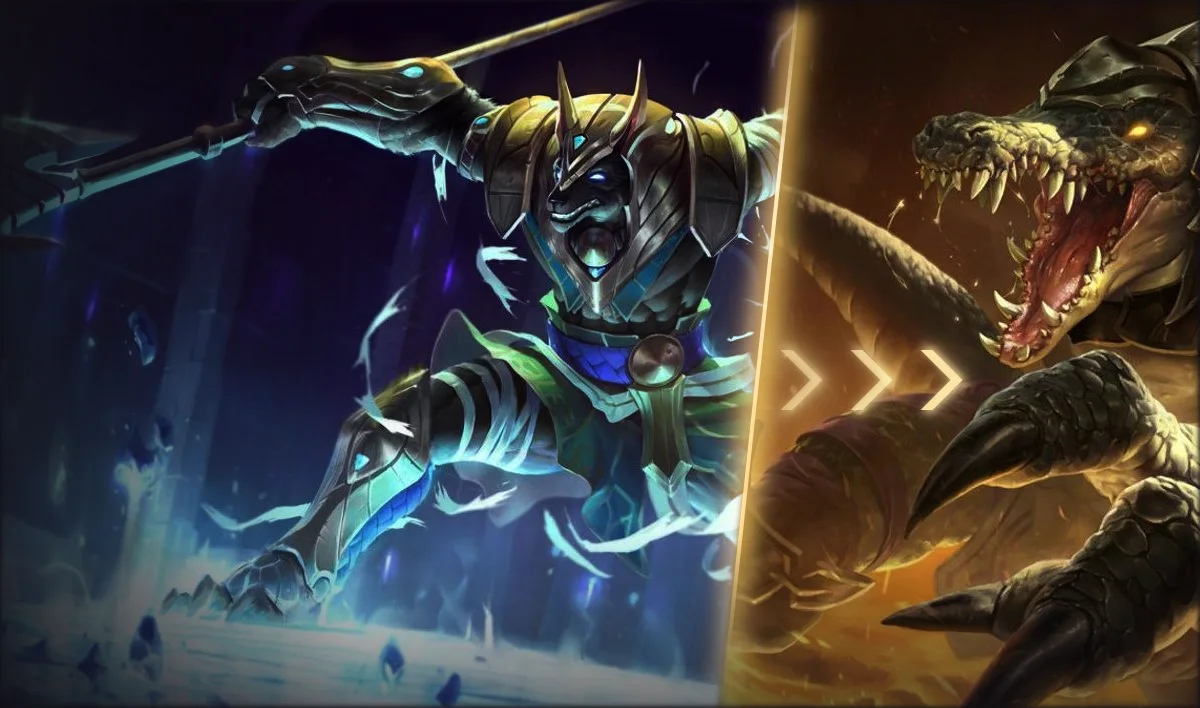
How to See Gold Difference in LoL: Free Overlay (2026)
League hides gold in your own games. Hold Tab and Hexgate shows each lane's gold difference and both team totals on the scoreboard. Free.
Your next game starts with the right build.
Join thousands of players using AI-powered builds to win more games.
Download HexgateHexgate runs on Windows PCs. Open hexgate.app on your computer to install it.
Join our Discord