The LoL AI Coach That Shows Why You Won or Lost
Hexgate is an AI coach for League of Legends that reviews every ranked (Solo/Duo and Flex), Normal Draft and Swiftplay game you play: it explains why you won or lost with evidence from the game, gives you one concrete tip for the next game, tracks the habits that repeat across your last 10 games in a role, saves every death as a clip to rewatch and scouts your lane opponent and the enemy jungler on the loading screen.
The coaching is part of Pro+, from €11.24 a month. Free and Pro show the real stats of every game.
- Uses Riot's own APIs
- No Overwolf
- Clips stay on your PC
- 3 free games a day
- Windows 10+
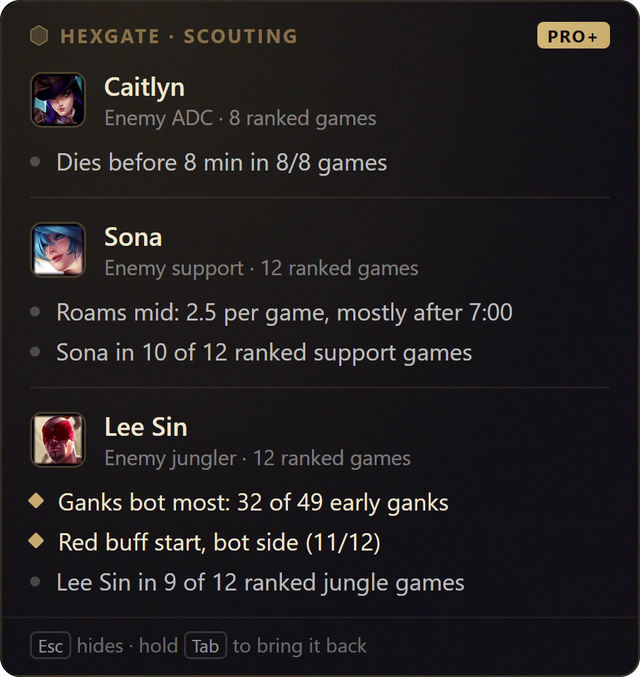
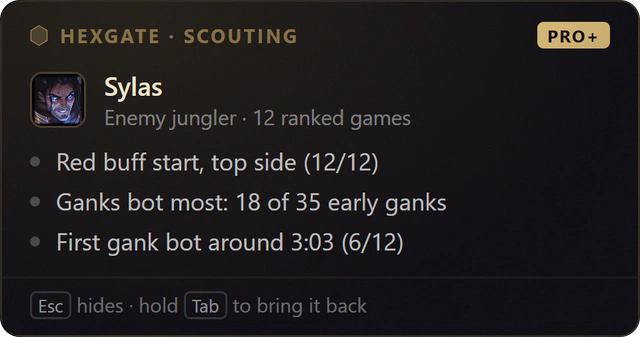
Loading screen. The enemy Lee Sin started on the bot side in 11 of his last 12 ranked games and ganks bot most, so both lines are marked for your lane.
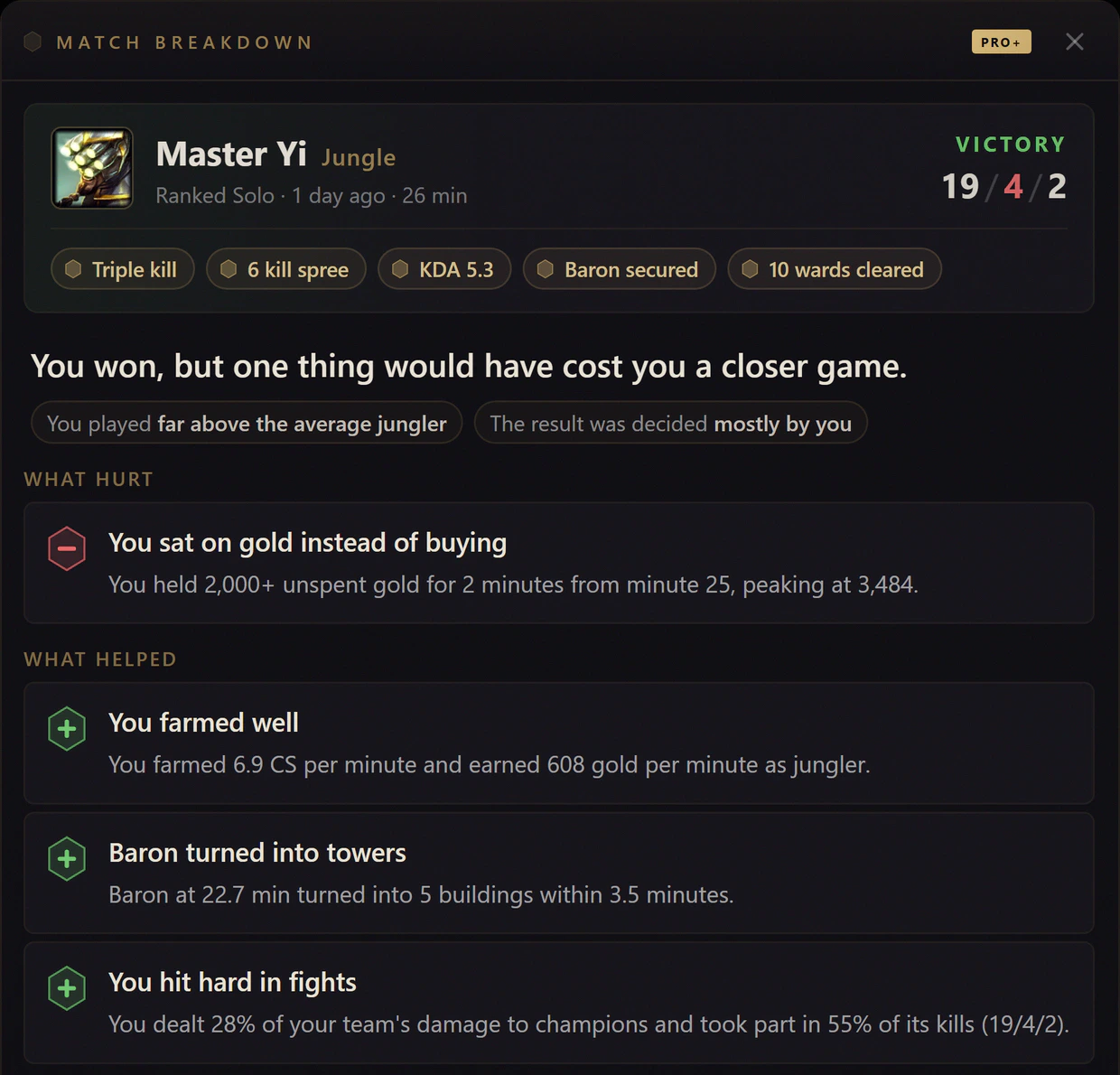
The game ends. You won, but 2,000+ unspent gold from minute 25 would have cost you a closer game. Every card shows its evidence.
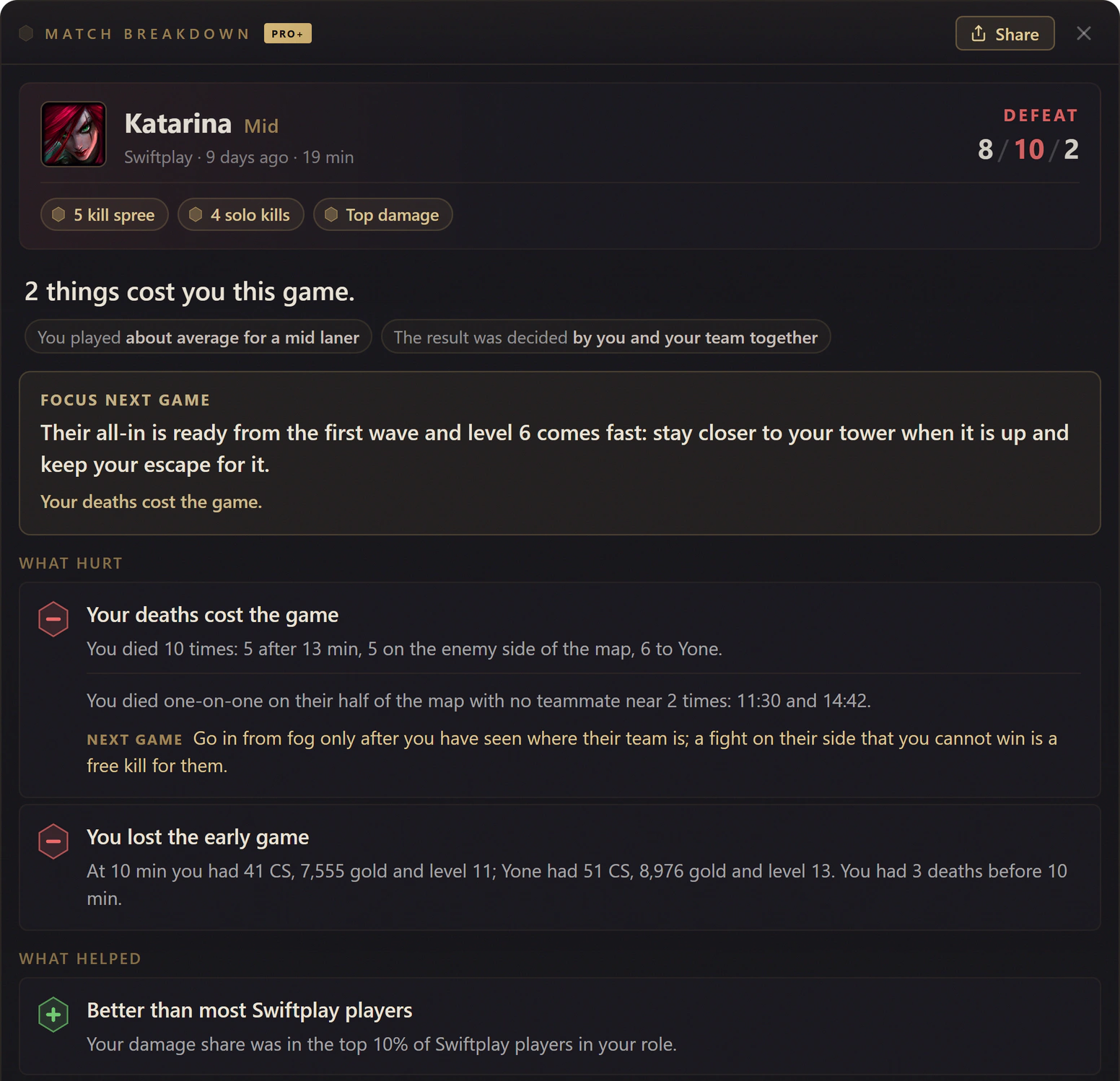
Next game. One focus, chosen from how the game went: stay closer to your tower when their all-in is up. Each card that hurt gets a tip too.
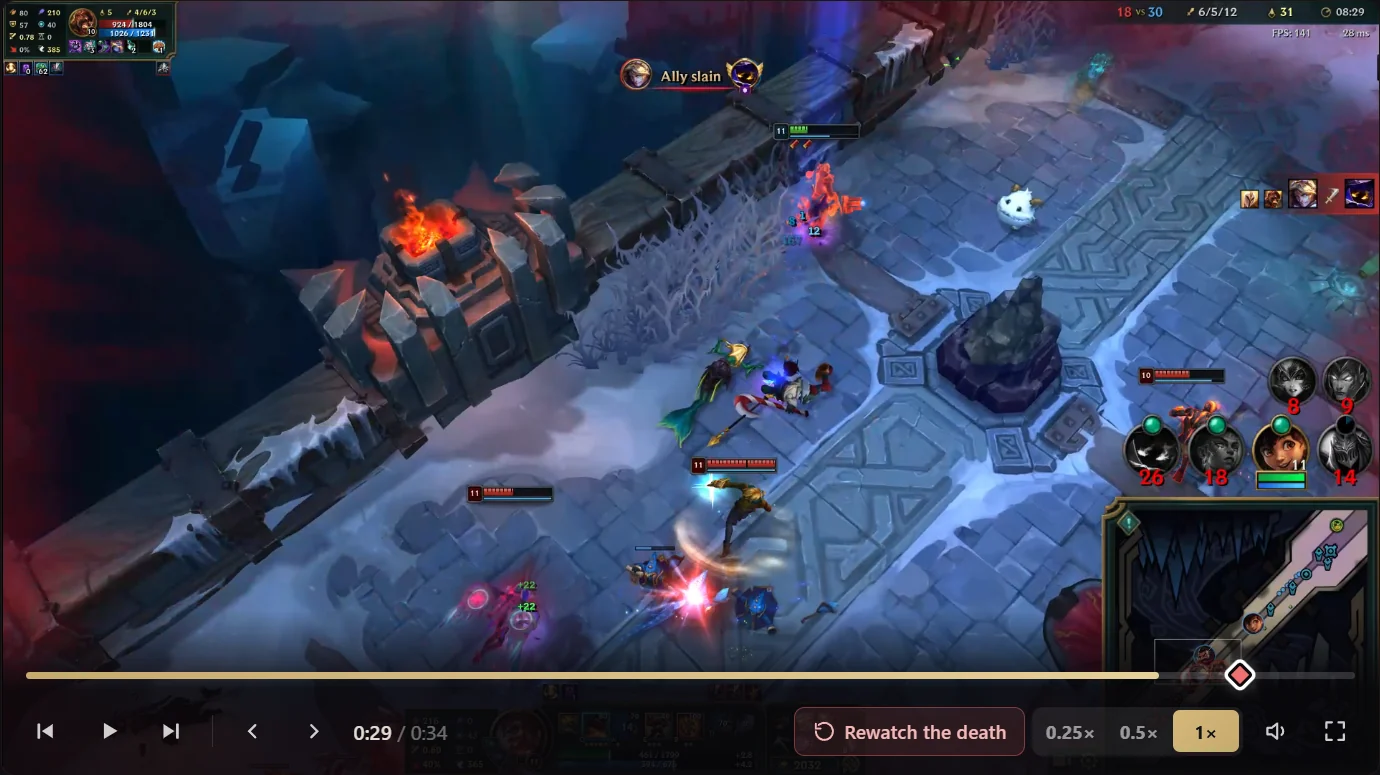
Rewatch. Every death is a clip that starts 3 seconds before it, at quarter, half or full speed (here, from an ARAM Mayhem game).
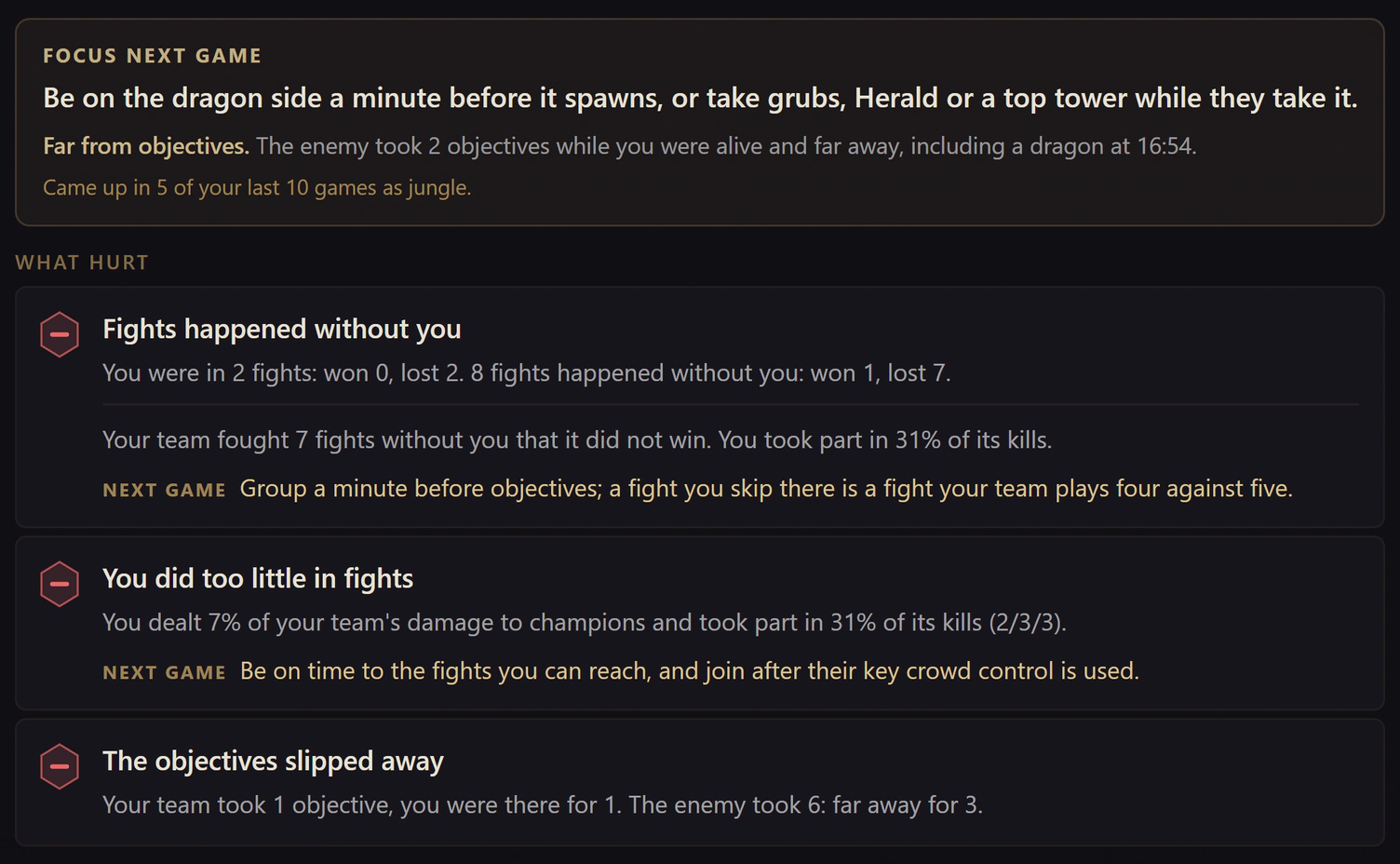
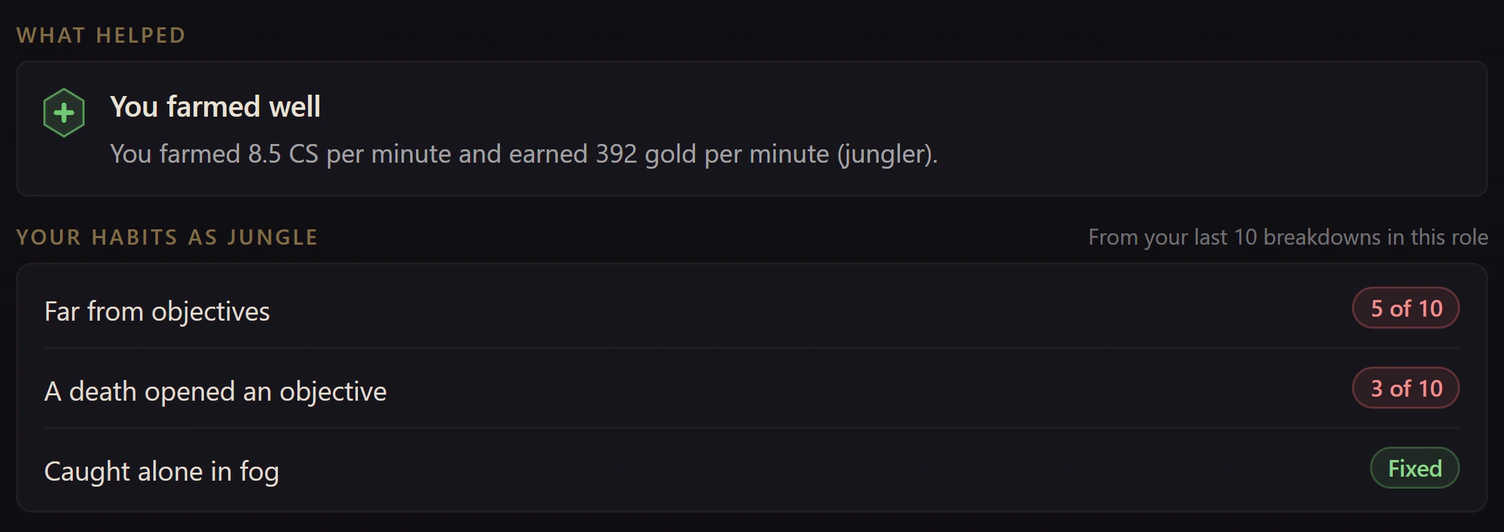
Across games. Far from objectives came up in 5 of the last 10 jungle games, so the focus says so. Caught alone in fog is marked Fixed.
After every game: why you won or lost
Right after a ranked, Normal Draft or Swiftplay game ends, Hexgate reads the game's own timeline and builds a Match Breakdown. It opens from your match history and says, in plain sentences, what hurt and what helped, with the numbers behind each call.
- The verdict. One line on how the game went:
2 things cost you this game
, orA clean win. Nothing to fix from this one.
- Whose result it was. How you played against the average player in your role, and whether the result was decided mostly by you, by your teammates, or by both.
- One focus for the next game. The single thing that mattered most, turned into something to do differently, not a list of twenty notes.
- The evidence. Each card is one thing that changed the result, backed by numbers from your game:
You died 10 times: 5 after 13 min, 5 on the enemy side of the map, 6 to Yone.
- A tip under each card. Chosen from how it happened: deaths to ganks while pushed get a different tip than deaths in a side lane after 20 minutes.
- Your rank, your role. Your numbers against real games of players in the same rank and role: here, a damage share in the top 10% of Swiftplay players in the role.
Judged for your role and class
Ganks and objectives for junglers, vision and roams for supports, the matchup and towers for laners. A support is never told to farm, and an enchanter is never told to walk in first.
Only what mattered
A small vision gap in a stomp is not a leak, and a loss that was not on you says so. A death that pulled three enemies away while your team took Baron counts as a trade, not a mistake.
The AI weighs, the game decides
The AI picks the two or three things that decided the game. It does not write the evidence: every minute, count and name comes straight from your game, so each card can be checked against the replay.
What the scoreboard never shows
Under the cards, the rest of the game in the order it happened. Every part is explained with real games in Match Breakdown: why you won or lost.
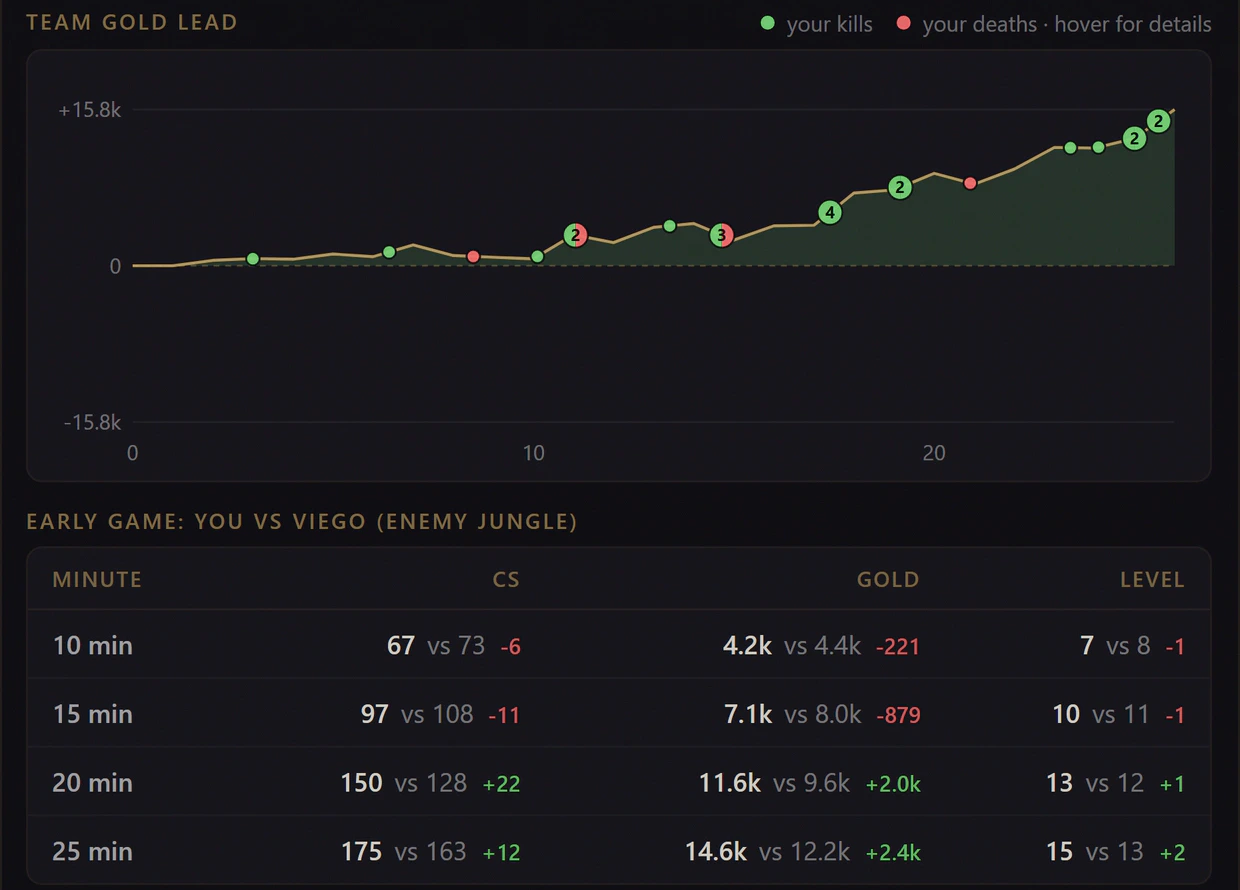
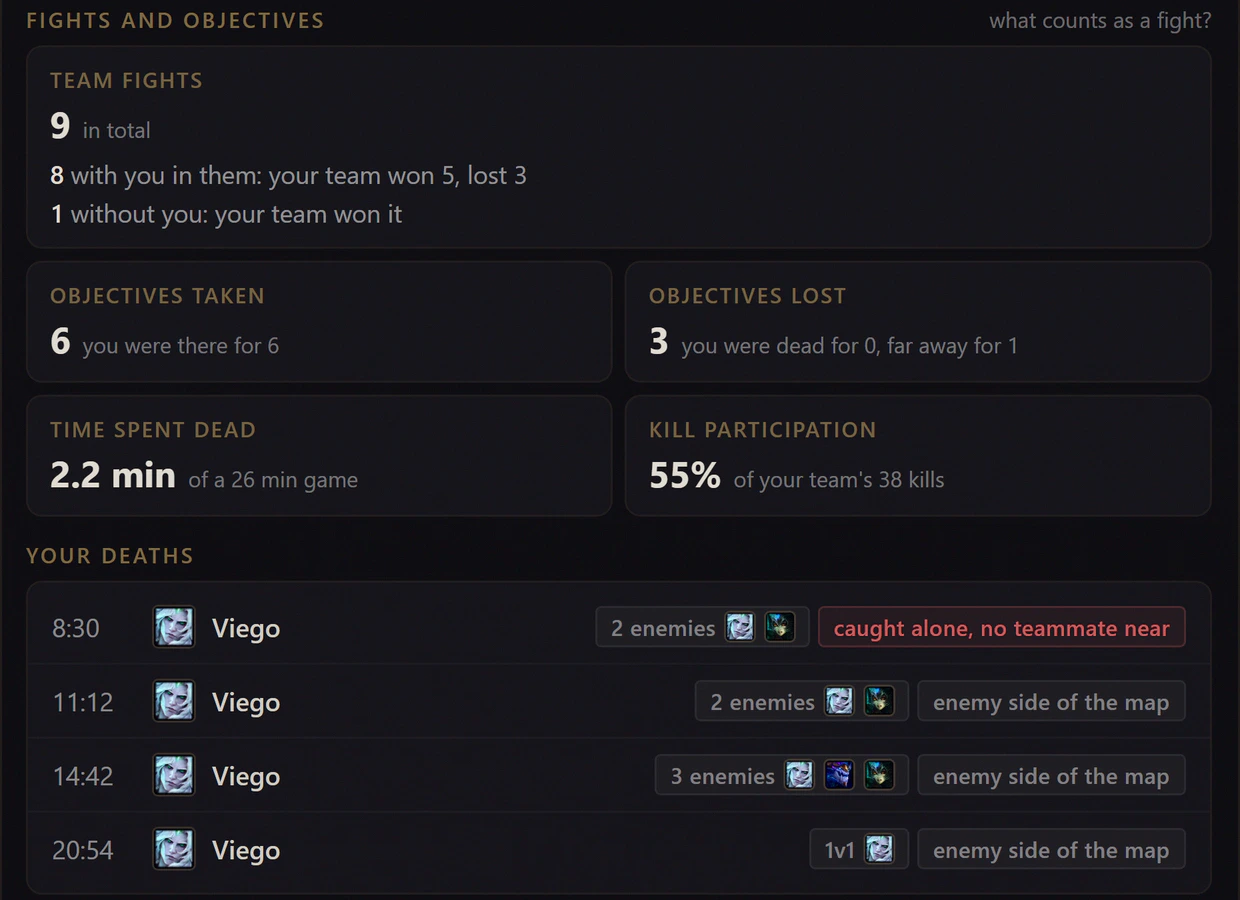
Across games: the mistakes you keep repeating
One bad game can be bad luck. Three in ten is a habit. Hexgate counts the mistakes that repeat across your breakdowns, role by role, so you know what to work on, and when it is gone.
- Habits, counted. When the same mistake shows up in 3 of your last 10 breakdowns in a role, it is listed as a habit with its count, like
Far from objectives, 5 of 10
. - Marked Fixed. Once a habit stops showing up, it is marked Fixed, so you see progress and not only problems.
- The focus knows. When the focus for your next game is a habit, it says so:
Came up in 5 of your last 10 games as jungle.
- Measured against your rank. Your numbers are compared with real ranked games of players in the same rank and role, so
my CS was low
becomesbottom 20% of Gold players in your role
, and a good game saystop 15% of Platinum players
.
Every death saved as a clip, ready to rewatch
Coaches all give the same advice: watch your own deaths. With Clips on, Hexgate records them while you play, and the moment the game ends every death, kill and assist is ready to rewatch. No replay file to open, no recording app to set up.
- Recorded while you play. Nothing to clip by hand. Your graphics card's video encoder (NVIDIA, AMD or Intel) does the work, so the game keeps its frame rate.
- Slow it down. Quarter speed, half speed or frame by frame. Every jump starts 3 seconds before the moment, so you see the setup, not only the result.
- See what went wrong. Who killed you and who got the final blow, where it happened on the minimap, and your level, gold and CS against your killer's.
- One click from the breakdown. Every recorded death in a Match Breakdown has a Watch button. The breakdown says why the death cost you; the clip shows you the moment.
- Stays on your PC. Saved in Videos\Hexgate by default and never uploaded. Only the League window and the game's sound are recorded, not your microphone or Discord. You choose how many games to keep.
- Your settings. 15 or 30 second clips or the full game with every moment marked, up to your game's resolution at 120 fps, in H.264 or AV1. Normal Draft and ranked are recorded by default; ARAM, ARAM Mayhem and Swiftplay can be turned on. League runs in Borderless window mode.
Before the game: your lane, scouted on the loading screen
When a ranked or Swiftplay game loads, Hexgate reads up to 12 recent games of your lane opponents and the enemy jungler, of the same mode and in the role they play now, and lists their early habits with the count behind each one.
- The enemy jungler. Start side, level 1 invades, first gank and the lane he ganks most. If you play a lane, he only appears when his habits concern you.
- Your lane opponents. Early solo kills, early deaths, CS at 10, roams for mids and supports, and Teleport plays for top laners.
- Counted, never guessed. Every line shows its count, like 11/12. Players with fewer than 4 games of that mode in the role are left out, and the card never fills space with a guess.
- On screen when it matters. The card stays until 1:30 in game and comes back while you hold Tab. Escape hides it earlier.
Free, Pro and Pro+: who gets the coach
Every tier gets a match history with the real stats of each game, and the in-game build overlay. The coaching, Clips and Lane Scouting are Pro+.
| Feature | Free€03 games a day | Pro€9.99 /month€7.49/mo yearly | Pro+€14.99 /month€11.24/mo yearly |
|---|---|---|---|
| After the game | |||
| Match history with the real stats of every game | Included | Included | Included |
| Match Breakdown: why you won or lost, with the evidence | Pro+ only | Pro+ only | Included |
| One focus and a tip for the next game | Pro+ only | Pro+ only | Included |
| Habits across your last 10 games in a role | Pro+ only | Pro+ only | Included |
| Your numbers against your rank and role | Pro+ only | Pro+ only | Included |
| Clips of deaths, kills and assists | Pro+ only | Pro+ only | Included |
| Before the game | |||
| Lane Scouting on the loading screen | Insight count | Insight count | Included |
| Rune import, picks, counters and bans in champion select | Included | Included | Included |
| Lane matchup scoring and OTP builds | Not included | Included | Included |
| During the game | |||
| Items ranked against the five enemies you face | Included | Included | Included |
| Gold difference on the Tab scoreboard | Included | Included | Included |
| ARAM Mayhem augment tiers on every card | Included | Included | Included |
| Games per day | 3 | Unlimited | Unlimited |
Subscribe here, then sign in to the app with the same account. Already on Pro? Switch to Pro+ from the billing portal in the app. See all plans, or how the in-game build overlay works.
Hexgate vs other LoL AI coaches
"AI coach" covers very different tools. Here is how Hexgate's post-game coaching sits next to three well-known ones. For live and draft coaches too, compare AI coaches in our roundup.
| Question | Hexgate Pro+ | CoachDiff | Replays.lol | Mobalytics GPI |
|---|---|---|---|---|
| What it does | Explains each game from its own timeline: the verdict, the evidence and one focus for the next game | Turns a replay into timestamped coaching | Records your games, with AI-generated VOD reviews | Scores your play in eight areas, from 0 to 100 |
| Which games | Every ranked, Normal Draft and Swiftplay game, automatically | Replays you submit: 2 reviews a month on the Starter plan | All your games, recorded automatically | Across your games, as a long-term score |
| Clips of your deaths | Deaths, kills and assists, saved on your PC | Each insight links to its moment in the replay | Full game recordings and in-game instant replays | Not part of the GPI |
| Runs on | Windows app, no Overwolf | Web app | Overwolf | Desktop app powered by Overwolf |
| Price | €14.99 a month, or €11.24 a month billed yearly | $29.99 to $99.99 a month, for 2 to 8 reviews | Free, with ads | Free, with a paid Plus tier |
We build Hexgate. Details about the other tools come from their own websites, checked on October 21, 2026.
Safe for your account, private by default
Built on Riot's own APIs
Hexgate reads the live game through Riot's Live Client Data API, which the game itself serves on your PC during a match, and your match history and game timelines through the League client. Lane Scouting uses the match history your League client already offers for any player. It works within Riot's third-party tool rules.
- Does not modify game files
- Does not read game memory or inject code
- Does not automate any input
Your games stay yours
Clips records the League window the same way streaming and clipping apps do, and keeps everything on your PC.
- Clips are saved locally and never uploaded
- Only the game's sound, never your microphone or Discord
- The scouting card shows champions only, and players who hide their name are skipped
- A standalone Windows app: no Overwolf, no ads
Your first breakdown in 3 steps
Download Hexgate
Free for Windows 10 and 11. Sign in with Discord, Microsoft, Google or email. It installs in seconds and updates itself.
Switch on Pro+
Subscribe on the website or in the app. The ranked, Draft and Swiftplay games already in your League client's recent history get their breakdowns right away.
Play your next game
Turn Clips on once. When the game ends, a small summary says your clips and your breakdown are ready.
Frequently asked questions
Is there an AI coach for League of Legends that analyzes my games?
Yes. Hexgate Pro+ analyzes every ranked (Solo/Duo and Flex), Normal Draft and Swiftplay game you play, right after it ends. It reads the game's own timeline and explains why you won or lost with the evidence: your deaths and who was involved, fights your team took without you, objectives lost while you were dead or far away, farming, vision and spending, all judged for your role. Each breakdown gives you one focus and a tip for the next game, and the mistakes that repeat across your last 10 games in a role are tracked as habits.
What is the best app to review my League of Legends games and find my mistakes?
It depends on the help you want. To have every game reviewed automatically, with the evidence and one thing to fix next game, Hexgate Pro+ does that with nothing to upload. For a long-term score of your skills across many games, Mobalytics' GPI rates eight areas of your play. Replay review services like CoachDiff turn a replay you submit into timestamped coaching. Our AI coach roundup compares six tools, including live and draft coaches.
How can I automatically record clips of my deaths in League of Legends?
With Hexgate Pro+, turn on Clips and keep Hexgate open while you play. It records the League window and the game's sound in the background with your graphics card's video encoder and keeps your deaths, kills and assists as clips, ready the moment the game ends. Each one plays in slow motion or frame by frame, starting 3 seconds before the moment, with who killed you and your level, gold and CS against theirs. Clips are saved on your PC, in Videos\Hexgate by default, and never uploaded. League must run in Borderless window mode.
Is there an app that scouts the enemy laner on the League of Legends loading screen?
Yes. When a ranked or Swiftplay game loads, Hexgate Pro+ Lane Scouting reads up to 12 recent games of your lane opponents and the enemy jungler and shows their early habits on a card, with the count behind each one: the jungler's start side, level 1 invades, first gank and the lane he ganks most, and for laners early solo kills, early deaths, CS at 10 and roams. The card stays until 1:30 in game and comes back while you hold Tab.
Does the AI make things up?
No. The AI decides which signals from your game deserve a card and which two or three things decided the result. It does not write the evidence: every minute, count and champion name on a card comes straight from your game's timeline, so you can check each one against the replay.
Which games does the AI coach analyze?
Ranked Solo/Duo, Flex, Normal Draft and Swiftplay games, with Swiftplay judged at its own faster pace. ARAM and ARAM Mayhem are not analyzed. When you upgrade, the games already in your League client's recent match history are analyzed too, so the list is full from day one.
Is there a free LoL AI coach?
Hexgate is free for 3 games a day, and every tier gets a match history with the real stats of each game. The coaching (the verdict, the focus and tips, habits and rank benchmarks), Clips and Lane Scouting are part of Pro+, at 14.99 EUR a month or 11.24 EUR a month billed yearly. Free and Pro players see how many scouting insights were found for their lane.
Is Hexgate safe for my League account?
Hexgate works within Riot's third-party tool rules. It reads the live game through Riot's Live Client Data API and your match history and timelines through the League client, and Clips records the game window the way streaming apps do. It does not modify game files, read game memory, inject code or automate any input.
Does Hexgate work on Mac?
No. Hexgate is a desktop app for Windows 10 and 11. It runs next to League of Legends on the same PC.
Does recording clips lower my FPS?
Recording uses the video encoder built into your graphics card (NVIDIA, AMD or Intel), the same hardware streaming apps use, so the game keeps its frame rate.